Please sign up for the Schoology Parent Email Digest to be notified via email of your child's Schoology activity and Course/Teacher updates. To setup the Parent Email Digest, follow these steps:
- Login to Schoology
- Click the downward-facing arrow next to your name in the upper right corner
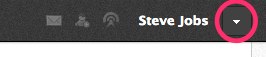
- Confirm you are viewing your child's Schoology account by selecting his/her name from the pull down menu

- When you see your child's name in the upper right corner & can see the "checkmark" next to his/her name, click the downward-facing arrow and select Notifications in the pull down menu

- In the Account > Notifications > Parent Email Digest page, select your options by turning "On" the Email Summary and choosing your Repeat and Time to receive email notifications of your child's activity from Schoology

#parents
Comments
0 comments
Article is closed for comments.